
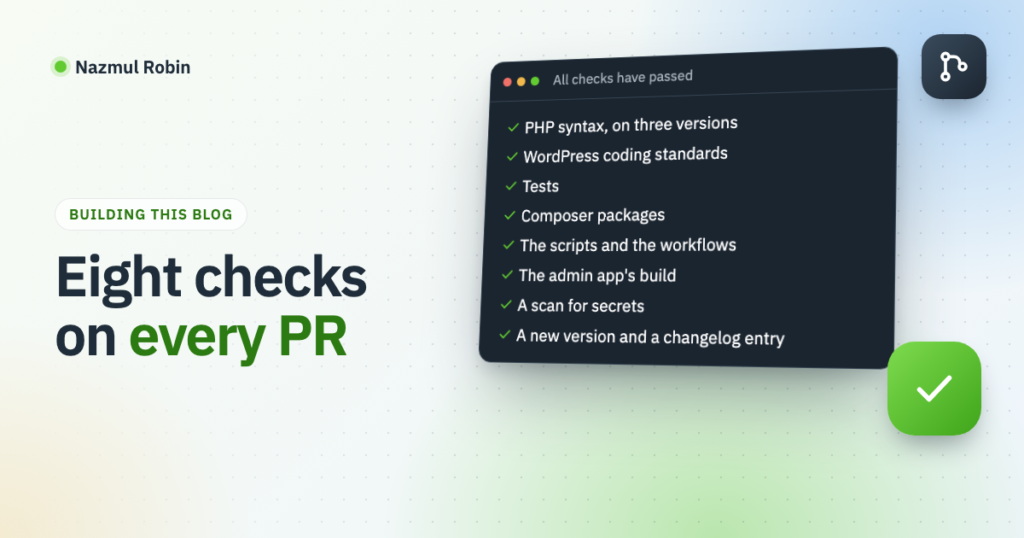
Every change to this blog’s code goes through a pull request, and eight small checks run on it before I merge. This post lists each check, the part of the workflow that runs it, and what it has caught so far.
This post is part of the series on how this blog is built. It builds on how the blog’s code is kept in git and deployed and on publishing posts from Markdown files.
Why a one-person project needs them
I am the only one who writes this code, and the only one who reviews it. Nobody else will notice a deploy script that deletes the wrong folder, or a token pasted into a file.
A push to the production branch goes straight to the live server. So the checks do the part of a review that a second person would do: read every line, every time, without getting tired.
All of them live in one file, .github/workflows/checks.yml, which starts like this:
name: Checks

on:
  pull_request:

jobs:
Each section below is one check in that file. Most of them are steps of one job, checks, which runs on PHP 8.2; the end of the post says why they are not a job each.
PHP syntax, on three versions
The plugin says it needs PHP 7.4. The server ran 8.2 when I set this up, and runs 8.5 now. Every tracked PHP file is checked on all three: on 8.2 in the checks job, and on the other two in a small job of their own:
  php:
    name: PHP syntax and tests (${{ matrix.php }})
    runs-on: ubuntu-latest
    strategy:
      matrix:
        php: [ "7.4", "8.5" ]

    steps:
    - uses: actions/checkout@v4

    - uses: shivammathur/setup-php@v2
      with:
        php-version: ${{ matrix.php }}
        coverage: none

    - name: Check every tracked PHP file
      run: git ls-files '*.php' | xargs -n 1 php -l
git ls-files lists only what is in the repo, so the plugins Composer installs are not checked. They are not my code.
WordPress coding standards
PHPCS with the WordPress standard reads the plugin, the theme and the must-use plugins. Besides code style, that standard has the rules I care about most: output is escaped, input is sanitized, and a form handler checks its nonce.
    - name: Install PHPCS with the WordPress standard
      run: |
        composer global config allow-plugins.dealerdirect/phpcodesniffer-composer-installer true
        composer global require --no-interaction wp-coding-standards/wpcs:^3.1

    - name: Run PHPCS with phpcs.xml.dist
      run: phpcs
The settings are in phpcs.xml.dist at the repo root. It names the folders, the text domain and the prefix every global name has to start with:
<config name="minimum_wp_version" value="6.7"/>
<!-- Warnings are reported but only errors fail the check. -->
<config name="ignore_warnings_on_exit" value="1"/>

<rule ref="WordPress.WP.I18n">
    <properties>
        <property name="text_domain" type="array">
            <element value="myblog"/>
        </property>
    </properties>
</rule>

<rule ref="WordPress.NamingConventions.PrefixAllGlobals">
    <properties>
        <property name="prefixes" type="array">
            <element value="myblog"/>
        </property>
    </properties>
</rule>
One false positive needed its own setting. My LinkedIn form handlers did not call check_admin_referer() themselves. They called one helper that checks the nonce and the user’s capability together:
function myblog_linkedin_check_admin( $action ) {
    check_admin_referer( $action );

    if ( ! current_user_can( 'manage_options' ) ) {
        wp_die( esc_html__( 'You are not allowed to manage the LinkedIn connection.', 'myblog' ), 403 );
    }
}
PHPCS does not look inside the helper, so it reported every handler as reading $_POST without a nonce check. The rule has a property for exactly this:
<rule ref="WordPress.Security.NonceVerification">
    <properties>
        <property name="customNonceVerificationFunctions" type="array">
            <element value="myblog_linkedin_check_admin"/>
        </property>
    </properties>
</rule>
That is better than a phpcs:ignore comment on every handler. A new handler that forgets the helper is still reported.
Tests
The site plugin has PHPUnit tests for the parts where a mistake is easy to make and hard to see: the Markdown parser, the reactions endpoint, the views route and the “reading now” count. There are 63 so far. They run with WP_Mock, which stands in for WordPress’s functions, so no database or WordPress install is needed. Like the syntax check, they run on all three PHP versions, as two more steps of the same jobs:
    # PHPUnit has its own composer.json in tests/, apart from the packages that are deployed.
    - name: Install PHPUnit
      run: composer install --working-dir=tests --no-interaction

    - name: Run the tests
      run: composer test --working-dir=tests
PHPUnit has its own composer.json in tests/ for the same reason as PHPCS below: the root vendor folder is copied to the live site.
Composer packages
    - name: Validate composer.json and composer.lock
      run: composer validate

    - name: Look for known vulnerabilities in the locked packages
      run: composer audit --locked
composer validate fails when composer.json was edited and the lock file was not updated with it. composer audit compares the locked packages with the published security advisories.
The scripts and the workflows
    - name: Check JavaScript syntax
      run: git ls-files '*.js' ':!:*/admin/*' | xargs -n 1 node --check

    - name: Check the deploy and staging scripts
      run: shellcheck deploy.sh staging.sh

    - name: Check the workflows
      run: |
        bash <(curl -fsSL https://raw.githubusercontent.com/rhysd/actionlint/main/scripts/download-actionlint.bash)
        ./actionlint -color
shellcheck failed on its first run, on this line of the deploy script:
rm -rf "$WP_PATH/$dir"If WP_PATH were ever empty, that line would delete /wp-content/plugins/... from the root of the server. The fix it asked for is three characters:
rm -rf "${WP_PATH:?}/$dir"With :? the shell stops with an error when the variable is empty or not set, and deletes nothing. The script had worked on every deploy until then. The check found a problem that only shows on the day something else goes wrong.
actionlint reads the workflow files themselves. A typo in a key name there is otherwise only found when the workflow runs, and for a deploy that is the wrong moment.
The admin app’s build
One wp-admin screen of the site plugin is a React app. The server has no Node, so the built files are committed. This check makes sure they belong to the source next to them:
    - name: The committed build matches the source
      run: |
        npm run build
        if [ -n "$(git status --porcelain admin/build)" ]; then
          echo "::error::admin/build is out of date. Run npm run build and commit the result."
          git status --short admin/build
          exit 1
        fi
It builds the app again and fails if git sees any difference. A step before it runs ESLint on the source.
A scan for secrets
The scan is a step of the checks job, so that job’s header carries what the scan needs:
  checks:
    name: Checks (8.2)
    runs-on: ubuntu-latest
    # gitleaks reads the pull request's list of commits.
    permissions:
      contents: read
      pull-requests: read

    steps:
    - uses: actions/checkout@v4
      with:
        fetch-depth: 0

    # ... the other checks ...

    - uses: gitleaks/gitleaks-action@v2
      env:
        GITHUB_TOKEN: ${{ github.token }}
gitleaks looks through the branch’s commits for things shaped like keys and tokens. fetch-depth: 0 gives it the full history; the default checkout has one commit.
This check also failed on its first run, and not because of a secret. On my private repo the workflow’s token could not read the pull request, and gitleaks needs the pull request’s list of commits. The permissions block fixed it.
A new version and a changelog entry
Every deploy of this blog is a numbered release. The last check makes sure a pull request that changes deployed code also raises the version and says what changed:
    - name: Deployed code needs a new version and a changelog section
      env:
        BASE: origin/${{ github.base_ref }}
      run: |
        plugin=wp-content/plugins/myblog/myblog.php

        if git diff --quiet "$BASE...HEAD" -- wp-content composer.json composer.lock deploy.sh staging.sh; then
          echo "No deployed code changed."
          exit 0
        fi

        version=$(sed -n 's/^ \* Version: *//p' "$plugin")
        before=$(git show "$BASE:$plugin" | sed -n 's/^ \* Version: *//p')

        if [ "$version" = "$before" ]; then
          echo "::error file=$plugin::Deployed code changed but Version is still $version."
          exit 1
        fi

        if ! grep -q "^## $version " CHANGELOG.md; then
          echo "::error file=CHANGELOG.md::CHANGELOG.md has no section for $version."
          exit 1
        fi
A pull request that only edits the README passes without a new version. One that touches anything the deploy copies does not.
After a deploy, the deploy workflow reads the same version, creates the git tag v1.2.3 and a GitHub release, and uses that version’s changelog section as the release notes. So the check on the pull request is what keeps the list of releases complete.
The posts have their own check
The posts are in a second repo, and a pull request there runs one Ruby script. It checks each file’s name, that the front matter is valid YAML with a title, a date and an excerpt, that the category is on the allowed list, and that a link to another post points at a post that exists.
The front matter check is there because of one title. It had a colon followed by a space in it and no quotes:
title: Claude Code tip: two accounts on one machineMy own sync reads each line with a regular expression and was happy with it. GitHub reads the block as YAML, could not parse it, and showed an error where the file’s preview should be. The script now parses the block the way GitHub does:
begin
  meta = YAML.safe_load(front, permitted_classes: [Date, Time])
rescue Psych::Exception => e
  fail_with.call("the front matter is not valid YAML (#{e.message.lines.first.strip}). Put a value containing a colon and a space in double quotes.")
  next
end
Things that caught me
- PHPCS cannot go into
composer.jsonhere. Composer’s vendor folder in this repo is copied to the live site with the plugin. So the workflow installs PHPCS globally, and locally I use any PHPCS that has theWordPressstandard. - File names clash with the standard. The standard wants
class-my-thing.php. My classes are loaded by Composer’s PSR-4 autoloader, which wantsMyThing.php. Those two file name rules are excluded inphpcs.xml.dist, with a comment saying why. - Warnings do not fail the check. Only errors do. Otherwise one warning I disagree with would teach me to ignore a red check.
- Each job costs at least a minute. GitHub bills a private repo’s Actions by the minute, rounded up for each job, and the free plan has 2,000 minutes a month. At first every check was a job of its own, twelve with the PHP versions, and each one took seconds but counted as a minute. That used most of a month’s minutes in October. Now the checks are steps of three jobs, and a pull request that only changes Markdown or
docs/skips them. The cost of that: a failed step stops its job, so a check after it shows its result on the next push. - A red check does not stop a merge. Branch protection on a private repo needs a paid GitHub plan. For now the rule is mine to keep: no merge while a check is red.
Next to the checks
Two more workflows run outside this file. Lighthouse measures the staging copy after each deploy to it, the home page and the newest post, and prints the scores. And Claude reviews each pull request that changes code and writes what it finds as comments. Neither blocks a merge; both are second opinions.
Eight checks, one workflow file, and two of them failed on their first run for good reasons.
Leave a Reply